AI Clothes Swap
Try on any outfit, dress, or uniform virtually with AI. Change clothes in photos instantly with realistic results.
What Is AI Clothes Swap?
AI clothes swap is a virtual try-on technology that replaces the clothing in a photo with a completely different outfit, while keeping the person's body, face, and pose unchanged. Instead of physically trying on garments or hiring a fashion photographer, you can see any outfit on your body in seconds using nothing but two photos and EZFaceSwap's AI.
The technology works by first segmenting the clothing region from both images — identifying exactly which pixels belong to the current outfit on the target body, and which pixels constitute the new garment in the source photo. The AI then removes the original clothing and renders the new outfit onto the body with physically accurate properties: how the fabric would drape given the body's pose, where wrinkles and creases would naturally form, how the fabric's texture and pattern would appear in the current lighting, and how shadows from the body would fall on the garment's surface.
This is far more sophisticated than placing a flat image of clothes over a photo. EZFaceSwap's clothes swap model is trained to understand fabric physics, body-garment interaction, and light interaction with different material types including smooth cotton, knit textures, denim, leather, and sheer fabrics. The result is a realistic rendering that looks like the person actually put on the new outfit, rather than a transparent composite layer.
The applications span personal fashion decisions, social media content, professional e-commerce photography, fashion design prototyping, and costume planning. Whether you want to preview tomorrow's outfit before getting dressed or virtually model an entire fashion collection, AI clothes swap delivers instant, realistic results at no cost.
How AI Clothes Swap Works
Three steps to virtually try on any outfit — no fitting room, no photographer, no editing skills needed.
Upload Body Photo & Target Outfit
Upload a photo of the person whose clothes will be changed (the body photo), and a photo of the outfit you want to apply. The outfit photo can be a product image from any store, a magazine photo, or any image where the garment is clearly visible.
AI Segments & Renders the New Outfit
EZFaceSwap's AI segments the clothing region on the body, removes the original garment, analyzes the target outfit's fabric, color, and texture, and renders the new outfit onto the body with physically accurate draping, wrinkle patterns, and lighting consistent with the original photo.
Download Your Virtual Try-On Result
The AI composites the new outfit onto the body with seamless edge blending at the neckline, sleeves, and waistline. Download the full-resolution result instantly — no watermark, no sign-up, no cost.
AI Clothes Swap Example
See how EZFaceSwap's AI replaces clothing while preserving natural body pose, lighting, and proportions.
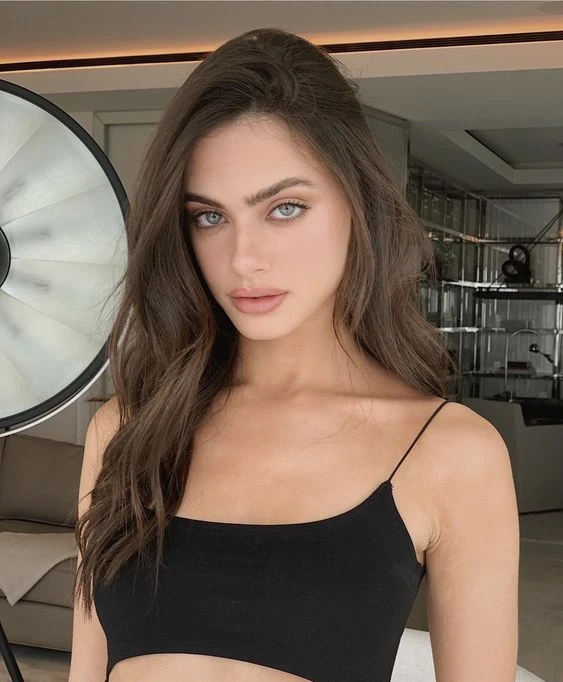
Virtual Outfit Try-On Result
Fabric draping, shadow, and color all rendered accurately. Original body pose and face preserved. Seamless edge blending at neckline and sleeves.
Key Features of AI Clothes Swap
What makes EZFaceSwap's virtual try-on produce realistic, wearable-looking outfit changes.
Any Style of Clothing
Works with casual tops, formal dresses, activewear, uniforms, costumes, and full outfits. Swap between any clothing category — the AI adapts to the garment type being applied.
Realistic Fabric Rendering
The AI renders fabric with physically accurate properties: drape, fold patterns, and surface texture are generated based on the outfit's material type and the body's pose, not just a flat overlay.
Accurate Color Matching
Color accuracy is maintained from the source outfit to the rendered result. The AI accounts for the photo's lighting conditions when rendering the new garment's color, preventing unrealistic bright patches or washed-out color.
Seamless Edge Blending
The AI handles the tricky transitions at necklines, sleeve ends, and waistbands — places where clothing meets skin — producing clean edges without visible cut lines or mismatched skin-fabric boundaries.
Body-Pose Adaptive
Outfit rendering adapts to the body's exact pose. If the person is reaching, sitting, or at an angle, the AI adjusts how the fabric would naturally drape and crease given that specific body position.
Free Virtual Try-On
Full-resolution clothes swap output at no cost. No account required, no watermark on your result, and no permanent storage of your uploaded photos. Try as many outfits as you want.
Popular Uses for AI Clothes Swap
From online shopping to professional fashion content, clothes swap transforms how people interact with clothing.
Online Fashion Try-On
Preview any garment on your own body before buying online. Find an item on any e-commerce site, save the product image, and use clothes swap to see it on your photo — eliminating size and style guesswork and reducing returns.
Fashion Design & Prototyping
Fashion designers and students use clothes swap to quickly visualize how a new design looks when worn on a real body, without producing a physical sample. Iterate on colorways, silhouettes, and styling combinations instantly.
Social Media & Content Creation
Create outfit-of-the-day content, fashion haul videos, and style comparison posts by generating multiple outfit variations from a single photo session. No need for multiple outfit changes and photoshoots.
E-Commerce Product Mockups
Online clothing retailers use clothes swap to quickly produce lifestyle product images showing their garments on diverse models without scheduling photoshoots — dramatically reducing content production cost and time.
Costume & Cosplay Planning
Preview how a specific costume or cosplay outfit will look on your body before purchasing fabric or accessories. Swap in reference costume photos to see the complete look before committing to construction.
Wardrobe Organization & Outfit Planning
Create a visual wardrobe by swapping different clothing combinations onto a single photo of yourself. Plan outfits for trips, events, or your weekly schedule visually, without trying on physical clothes.
AI Clothes Swap — Frequently Asked Questions
What is AI clothes swap and how does it work?
What types of clothing can be swapped with AI?
Can I try on clothes from an online store with AI clothes swap?
Is AI clothes swap free to use?
What image formats and sizes are supported?
Will the AI accurately match fabric texture and color?
Can I swap clothes in group photos?
How is clothes swap different from body swap?
Try AI Clothes Swap Free — Virtual Try-On in Seconds
Upload your photo and any outfit image. Get a realistic virtual try-on result instantly — free, no watermark, no sign-up.
Want sharper, more accurate face swaps? Sign in for better results →