AI Body Swap
Place your face on any body, outfit, or pose with AI. Realistic body swap with natural blending and proportions.
What Is AI Body Swap?
AI body swap is an image compositing technology that places your face onto a completely different body in a photo. Rather than editing your own photo, you choose a target body — any person in any pose, wearing any outfit — and the AI seamlessly transfers your face onto that body's head position, producing a new image where your face appears naturally attached to the new body.
This goes far beyond a simple copy-paste operation. EZFaceSwap's body swap AI analyzes the neck angle, head tilt, lighting direction, and skin tone of both images simultaneously. It warps your face to match the target's head pose, adjusts color temperature to match the body's lighting environment, and applies edge blending at the face boundary to eliminate visible seams. The result is a convincing composite that looks like a genuine photograph.
The creative applications are enormous. Fashion shoppers use body swap to see how an outfit worn by a model would look with their own face, eliminating the guesswork of online shopping. Cosplayers use it to preview character costumes. Content creators use it for fantasy composites — seeing themselves as athletes, celebrities, or fictional characters. Marketers use it to produce personalized promotional images without expensive photoshoots.
EZFaceSwap makes professional-quality body swap available to everyone for free, with no software to install, no design experience required, and results delivered in seconds rather than hours of manual editing.
How AI Body Swap Works
Three straightforward steps to place your face on any body — no editing skills needed.
Upload Your Face & Target Body
Upload a clear photo of your face as the source image. Then upload the target body photo — a model, athlete, costume character, or any image where you want your face to appear. Both images should be well-lit and high-resolution.
AI Maps & Aligns the Composite
EZFaceSwap detects the facial landmarks in your source photo and the head position on the target body. The AI calculates scale, rotation, and perspective adjustments to align your face naturally onto the target's head, matching the exact pose and camera angle.
Blend, Color-Match & Download
The AI applies color grading to match your face's skin tone to the target body's lighting. Edge blending at the face boundary and neck region creates a seamless transition. Download your full-resolution body swap result instantly — no watermark.
AI Body Swap Examples
Realistic face-on-body composites across different outfits, body types, and scenarios.
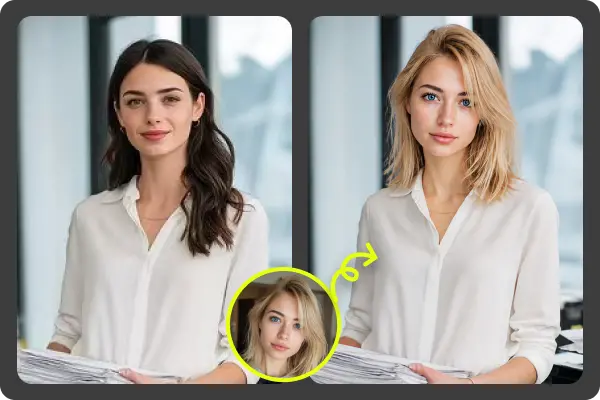
Professional Outfit Body Swap
Natural face blending on a formal body pose
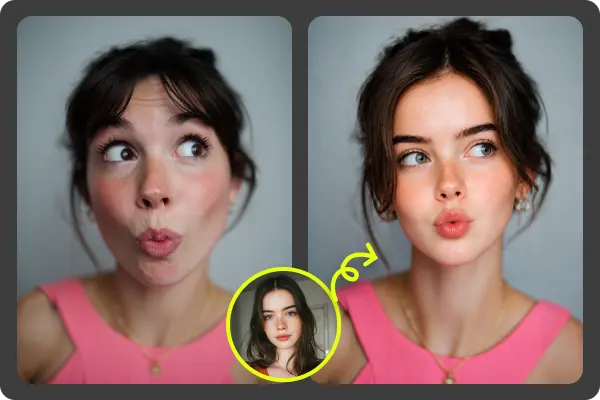
Skin Tone & Lighting Match
AI corrects color temperature between face and body
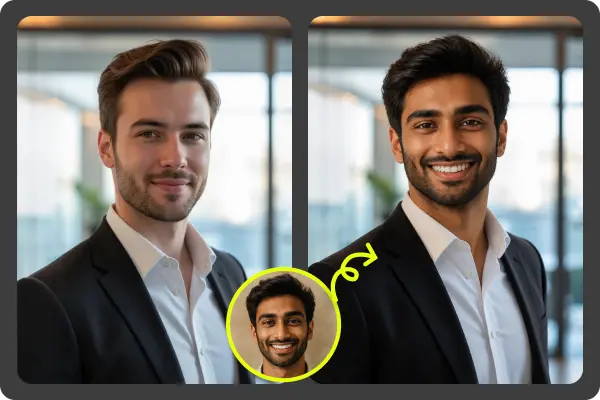
Full-Resolution Download
Original image quality preserved, no watermark added
Key Features of AI Body Swap
Built for realistic results across diverse body types, outfits, and photo styles.
Any Body Type Supported
Works with slim, athletic, or plus-size body photos. The AI adjusts face scale and perspective to match the target body's proportions, producing a naturally proportioned result regardless of body size difference.
Realistic Pose Matching
Whether the target body is standing, sitting, or at an angle, the AI rotates and warps your face to match the head tilt and camera perspective of that exact pose.
Outfit & Costume Compatible
Body swap works with any outfit: business attire, athletic wear, fantasy costumes, historical uniforms, or casual clothing. The outfit on the target body transfers as part of the composite.
Automatic Color Grading
The AI analyzes and matches color temperature, brightness, and skin tone between your face and the target body, preventing the tell-tale color mismatch that exposes poor composites.
Seamless Neck Transition
Edge blending at the face-to-neck boundary is handled automatically — no visible hard edges or mismatched skin patches at the junction between face and body.
Free, Fast & Private
Body swap results are generated in seconds at no cost. No sign-up required, no watermark on output, and uploaded photos are not stored permanently or shared with third parties.
Popular Uses for AI Body Swap
From fashion try-on to creative fantasy content, body swap unlocks new possibilities in image editing.
Fashion Try-On
See how a specific outfit looks with your face before buying online. Upload a product image with a model wearing the item, swap your face in, and get an immediate personalized preview without visiting a fitting room.
Fantasy Costumes & Cosplay
Place your face on elaborate cosplay reference photos, superhero suits, medieval armor, or sci-fi costumes. Perfect for planning your next cosplay build or creating fantasy profile photos.
Professional Photo Production
Marketing teams use body swap to quickly produce personalized promotional images — placing a specific person's face on a model body in branded clothing, without scheduling a full photoshoot.
Social Media & Viral Content
Place your face on athletes, celebrities, or iconic movie character bodies for humorous and shareable social media content. Body swap memes and fantasy composites consistently drive high engagement on Instagram and TikTok.
Gaming & Character Creation
Game streamers and content creators use body swap to create personalized character art — placing their face on game character bodies for thumbnails, profile artwork, and promotional graphics.
Personalized Gifts & Print Products
Create custom gifts by placing a friend or family member's face on a humorous or themed body template — an astronaut, superhero, or historical figure — and print on posters, mugs, or greeting cards.
AI Body Swap — Frequently Asked Questions
What is AI body swap and how does it work?
Can I put my face on any body type with AI body swap?
What kind of photos work best for body swap?
Can I use body swap to try on different outfits or costumes?
Is AI body swap free?
What image formats does body swap support?
Will the result look realistic?
How is body swap different from head swap?
Try AI Body Swap Free — No Sign-Up Needed
Upload your face photo and any target body image. Get a realistic body swap result in seconds — free and watermark-free.
Want sharper, more accurate face swaps? Sign in for better results →